1. Introduction to Steganography
Steganography is the art of concealing information within other seemingly innocuous media—such as
images or
audio files—so that the very existence of the hidden message remains secret. Unlike
encryption, which
obscures the contents of a message, steganography hides the message in plain sight.
This software application is a modern demonstration of digital steganography, enabling users to hide
encrypted text messages within image or audio files, and later retrieve them securely.
2. Core Features of the Application
1. Dual Media Support: Supports encoding and decoding hidden messages in both image (.png,
.jpg, .jpeg) and
audio (.wav) files.
2. Caesar Cipher Encryption: Messages are first encrypted using the Caesar cipher before being
embedded,
adding an extra layer of security.
3. Graphical User Interface (GUI): Built with Java Swing, the application features a
user-friendly interface
for seamless interaction.
4. Navigation Panel: A top navigation bar allows switching between Image Encode, Image
Decode, Audio Encode,
and Audio Decode sections.
5. Shift Recovery: The shift used in Caesar cipher encryption is also embedded and recovered during
decoding.
3. How Image Steganography Works
Encoding Process:
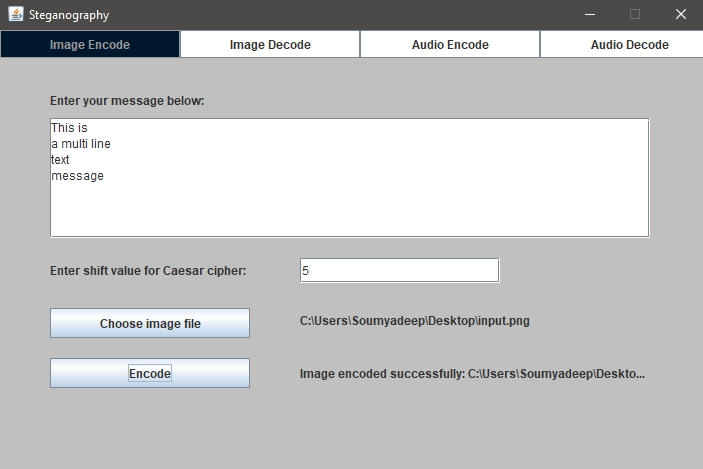
1. Message Input: The user enters a secret message and selects a Caesar cipher shift value.
2. Image Selection: A compatible image file is selected.
3. Encryption: The message is encrypted using the Caesar cipher.
4. Binary Conversion: The encrypted text, along with the cipher shift value, is converted to binary
format.
5. LSB Embedding: Each bit of the binary message is embedded into the Least Significant Bits
(LSBs) of the
red, green, and blue channels of the image pixels.
6. Output: A new image file is generated containing the hidden message.
Decoding Process:
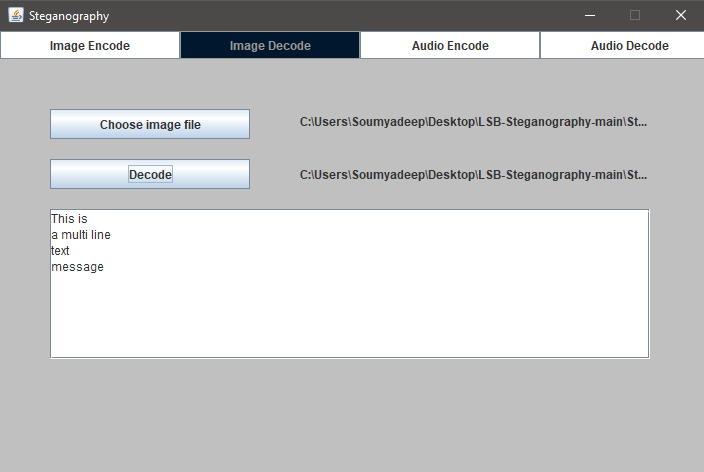
1. Image Selection: The user loads the encoded image.
2. Bit Extraction: The application extracts LSBs from each pixel and reconstructs the binary
message.
3. Marker Detection: Special binary markers indicate where the message and cipher shift end.
4. Decryption: The extracted encrypted message is decrypted using the recovered shift value.
5. Result Display: The original hidden message is displayed in the GUI.
4. How Audio Steganography Works
Encoding Process:
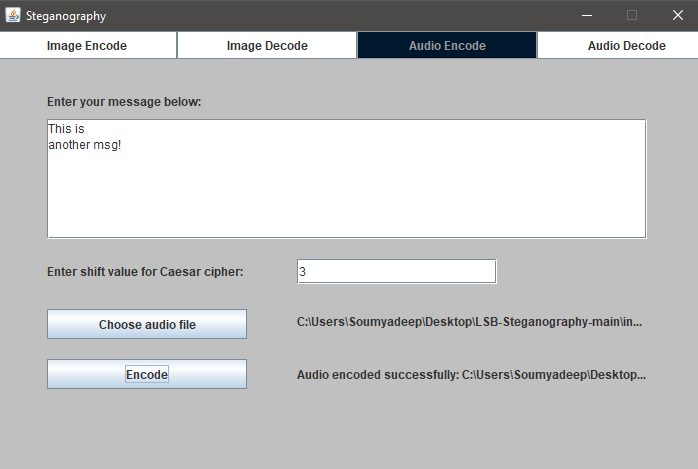
1. Message Input: Similar to image encoding, the user provides a message and a Caesar shift
value.
2. Audio File Selection: A .wav file is chosen.
3. Encryption & Conversion: The message is encrypted and converted to binary.
4. Embedding: Binary bits are embedded into the least significant bits (LSBs) of the least
significant bytes (LSBytes) of audio samples, which are stored in Little Endian format.
5. Output: A new .wav file is saved, which sounds identical but contains the hidden message.
Decoding Process:
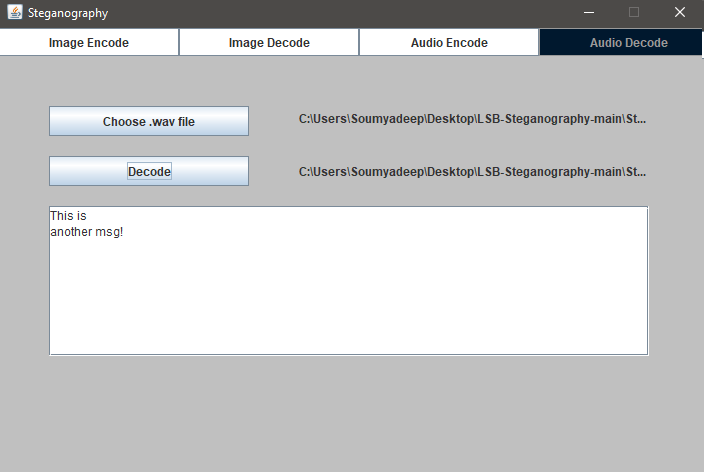
1. Audio File Selection: The encoded .wav file is opened.
2. LSB Extraction: Bits are read from the LSBs of audio sample bytes.
3. Marker Detection: Special sequences indicate the end of the message and the cipher shift.
4. Binary Reconstruction & Decryption: Binary is converted back to characters and decrypted.
5. Result Display: The decrypted message is shown in the application.
5. Encryption Algorithm Used: Caesar Cipher
The Caesar cipher is a simple substitution cipher where each letter in the plaintext is shifted by a
fixed
number of places. The application ensures:
- Encryption and decryption stay within printable ASCII characters.
- Newline characters are preserved for message formatting.
- The shift value itself is embedded within the file for automatic retrieval during decoding.
6. Technical Architecture
The application is structured using modular Java classes, separating concerns between GUI
components and core logic. The interface is built using Java Swing, while encoding and
decoding logic for both image and audio steganography is implemented in dedicated classes such as
ImageEncode, ImageDecode, AudioEncode, and AudioDecode.
Utility classes like EncryptAndConvert and DecryptAndConvert handle the Caesar cipher logic
and binary transformations, ensuring clear separation between encryption and steganography mechanisms.
7. File Format and Data Handling
The software supports PNG, JPG, and JPEG formats for images and WAV format for audio. During
encoding, the encrypted message is converted to a binary string, which includes a terminator marker
(00000000) to signify the end of the message and an additional marker after the Caesar shift value.
In image files, bits are embedded into the least significant bits of RGB pixel channels, while in
audio files, bits are embedded in the LSBs of audio samples. The decoding process reverses this
embedding, detects terminator patterns, extracts the binary message, and decrypts it using the embedded
Caesar shift.
8. Limitations and Considerations
This implementation assumes that the input image or audio file is large enough to hold the entire binary
representation of the encrypted message and cipher value. There is no pre-check for available capacity.
Additionally, the Caesar cipher is not cryptographically strong and is used here for demonstration purposes
only.
The application does not currently support error detection or correction, meaning tampering with encoded
media may result in loss or corruption of the hidden message.